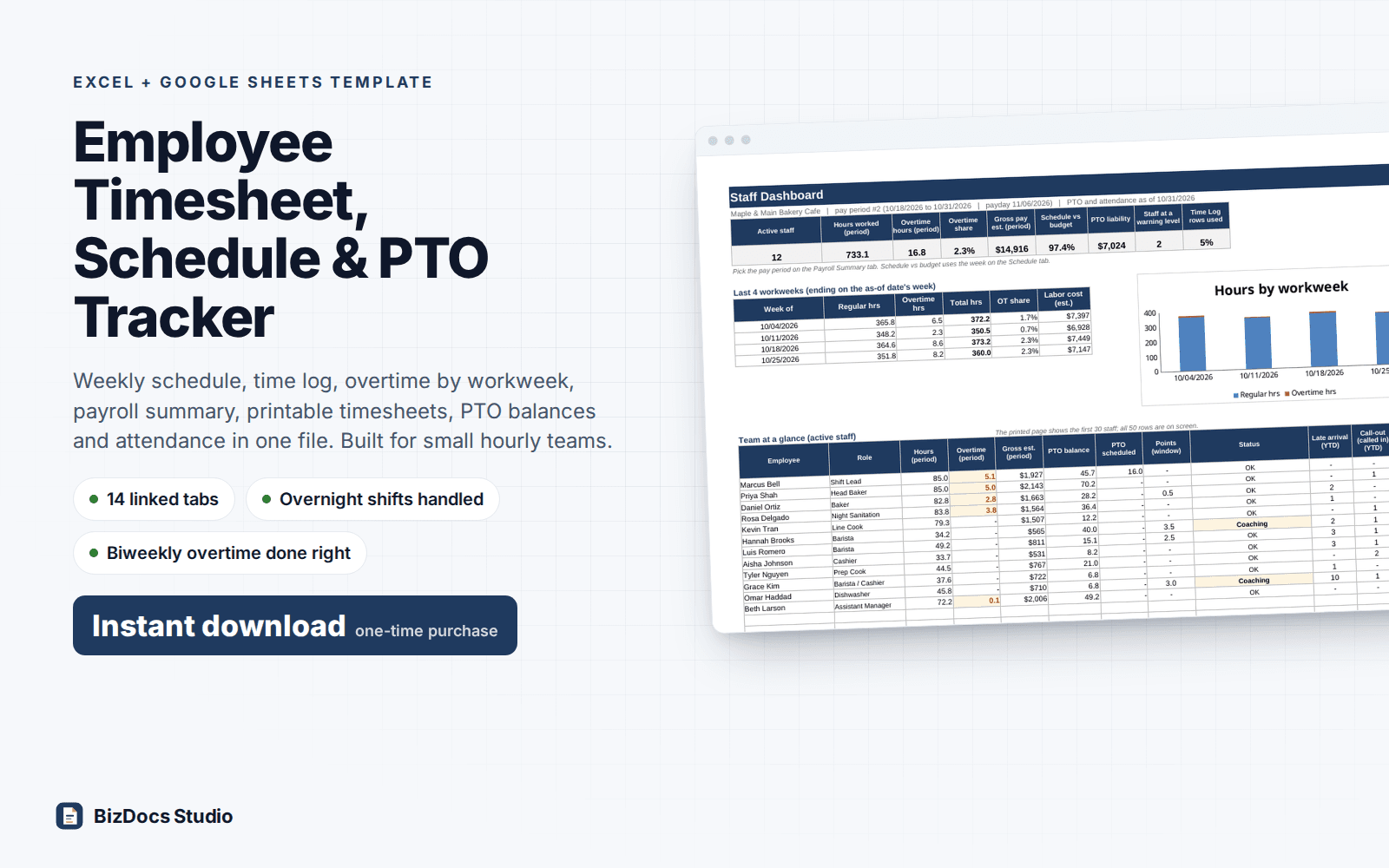
Employee Timesheet, Schedule & PTO Tracker for Excel and Google Sheets
Employee Timesheet Template with Schedule & PTO Tracker
Weekly schedule, timesheets with overtime, PTO balances and attendance for up to 50 hourly employees.
- Instant download · Excel workbook (.xlsx), opens in Google Sheets
- 14-day refund, no questions asked
- Personal and business use license
- Free updates to this version
Works with
- Microsoft Excel 2010 or newer
- Google Sheets (File > Import)
- Excel for Mac
- No macros, no add-ins
Made for: Restaurants, cafes and bakeries, Retail shops, Cleaning crews, Clinics and small offices with hourly staff.
14 tabs, one linked system
An employee timesheet template for small employers with up to 50 hourly staff. Build the weekly schedule with labor cost against budget, log time in and out with overnight shifts and unpaid breaks, and the workbook counts overtime per workweek for weekly, biweekly or semi-monthly payroll, prints one-page signed timesheets and a payroll summary, accrues PTO with caps and keeps an attendance log with a yearly calendar. Excel and Google Sheets.
- 1
Start Here
Two setup steps, the weekly and payday routine, how the overtime and break math works, capacity and how to roll into a new file, color legend.
- 2
Dashboard
Active staff, hours, overtime share, gross pay estimate, schedule vs labor budget, PTO liability, staff at a warning level, Time Log rows used, last 4 workweeks with chart, team table.
- 3
Settings
Workweek start day, pay period type and first period, weekly and optional daily overtime, multiplier, automatic meal break, punch rounding, PTO policies, attendance codes and points, time-off types, and a Settings check that names any blank, text or off-list setting and what the file uses instead.
- 4
Employees
Up to 50 people: ID, role, type, status, hire date, hourly rate, PTO policy, starting PTO balance and last day worked. A Check column flags a repeated name (counted once), a missing or unlisted status, type or PTO policy, a missing rate, and dates or numbers typed as text.
- 5
Schedule
One week, 30 staff per sheet: pick each name, type start and end per day, hours and estimated cost per person, staff and hours per day, over or under your weekly labor budget. Approved time off shows in blue; inactive or unknown names, times typed as text and a start without an end are flagged. Prints on one page.
- 6
Time Log
4,000 shift rows: date, employee, time in, time out, unpaid break. Hours, regular, overtime, pay period and workweek calculate. A Check column flags missing punches, zero-length shifts, breaks as long as the shift, negative or non-number breaks, dates or times typed as text (those rows are not counted), unknown names and overnight shifts to split at midnight. Shows rows used.
- 7
Payroll Summary
Pick a pay period: regular, overtime and PTO hours, regular, overtime and PTO pay and gross estimate per employee, with totals.
- 8
Timesheet
Pick an employee and a period: every shift, hours by workweek, paid time off, pay summary, certification and signature lines on one printed page.
- 9
PTO Requests
One row per day off: type, hours, status. Only approved rows are paid and taken from the balance; pending and over-balance requests are flagged.
- 10
PTO Tracker
Per employee: accrued, used, lost to cap, balance now, scheduled, available, pending, max carryover and dollar liability. Per-pay-period policies credit pay periods the person worked in full.
- 11
PTO Ledger
Running PTO balance at the end of every pay period, with the cap applied before time taken. A one-page print view shows 26 pay periods; with weekly pay you print it twice (from period 1, then 27).
- 12
Attendance Log
Late arrivals, left early, call-outs, no call no shows, missed punches and excused absences, with points from your codes.
- 13
Attendance Calendar
A 12-month grid for one employee or the whole team, colored by points per day, with a year summary and the rolling-window point total.
- 14
Pay Periods
Every period of the year built from Settings: dates, payday, status, hours, overtime, PTO and gross estimate.
What you can count on
- Overtime counted per workweek, never averaged, so a 44 + 36 hour biweekly period still pays 4 hours of overtime
- Weekly, biweekly or semi-monthly pay periods; workweeks that cross a period boundary are handled
- Overnight shifts (10:00 PM to 6:30 AM) calculate correctly; a shift running into a new workweek is flagged to split at midnight
- Optional daily overtime threshold; automatic unpaid meal break with a blank vs 0 distinction
- PTO accrual per hour worked or per pay period, with a balance cap; accrual stops after an employee's last day, and per-pay-period accrual counts only pay periods worked in full
- Printable weekly schedule and one-page timesheets with signature lines
- 50,000+ formulas, all visible and editable; sample payroll re-derived independently to the cent
Last updated November 20, 2026. Buyers get updates to this version free, by email.
Before you buy
Does it work in Google Sheets?
Yes. Open Google Sheets, File > Import > Upload the .xlsx. Formulas, dropdowns and colors carry over. Every formula uses functions that both Excel and Sheets support; there are no macros.
Does it follow my state's overtime and break rules?
You set the rules: weekly overtime threshold, an optional daily threshold, the multiplier, an automatic unpaid meal break and punch rounding. It does not calculate double time or seventh-day rules. Rules differ by state and city, so confirm yours with your payroll provider or an employment professional. This is a record-keeping tool, not legal or tax advice.
Does it replace my payroll service?
No. It gives you hours and a gross pay estimate per employee for each pay period. Taxes, withholding and deductions stay with your payroll provider or accountant. Every period uses the current hourly rate, so save closed periods as PDF before you give a raise.
How many employees and shifts does it hold?
50 employees on file, 4,000 shift rows, 400 PTO days and 1,000 attendance events. At 5 shifts a week, 4,000 rows is a full year for about 15 people or about 6 months for 30. The Time Log and Dashboard show how full the log is; when it fills, start a new copy at a pay period boundary and carry each PTO balance over. The schedule shows 30 people per sheet.
Can I change it?
Yes. Nothing is locked or hidden. Pale-yellow cells with blue text are inputs; formulas are visible. Set your PTO policies, attendance codes and time-off types in Settings before you enter data; roles are free text on the Employees tab. If you rename a policy, code or type later, use Find & Replace on Employees and the logs as well. Check columns and a Dashboard warning flag any row that no longer matches.
How do I get the file?
Instantly after payment: a download page opens and the link is also emailed to you. Lost it? Email us and we resend it.
What if it is not what I need?
Email us within 14 days and we refund you. No forms, no questions.
Learn before you fill it in
Employee Timesheet, Schedule & PTO Tracker
$11 one-time · instant download · 14-day refund