Rental Property Income & Expense Tracker for Excel and Google Sheets
Rental Property Income & Expense Spreadsheet
Track rent and expenses for each property, with a Schedule E summary at tax time.
- Instant download · Excel workbook (.xlsx), opens in Google Sheets
- 14-day refund, no questions asked
- Personal and business use license
- Free updates to this version
Works with
- Microsoft Excel 2010 or newer
- Google Sheets (File > Import)
- Excel for Mac
- No macros, no add-ins
Made for: Self-managing landlords (1 to 10 units), House hackers and duplex owners, Small real estate LLCs, Anyone handing a shoebox to a tax preparer.
7 tabs, one linked system
A rental property spreadsheet for landlords with up to ten units. Log rent and expenses as they happen; the workbook tracks who has paid, totals each property's net operating income and maps every expense category to the matching IRS Schedule E line, so tax time is a copy, not a project. Excel and Google Sheets.
- 1
Settings
Owner name, tax year, rent due day, grace period, late fee and a vacancy allowance (5% in the sample) used by the cash flow estimate on Properties. Due day, grace period and late fee are for reference only; no formula applies them, and the tab says so. Also holds 17 expense categories with their Schedule E line plus 5 blank rows for your own, 6 income types, maintenance statuses, property types and unit statuses (each list with blank rows for your own), and the Transactions category dropdown built from the categories and income types.
- 2
Properties
Ten rows, one per unit: property ID, address, type and status dropdowns from lists on Settings, purchase date and price, cash invested, monthly rent, mortgage P&I, taxes, insurance and HOA. Estimated monthly cash flow is rent less the vacancy allowance, minus mortgage, taxes, insurance and HOA. The sample duplex's loan sits on Unit A.
- 3
Tenants
20 rows: property ID, tenant name, phone, email, lease start and end, rent, deposit held and notes. Days to lease end counts down from today and goes negative once a lease has passed. Deposits held are totaled and leases ending within 60 days are counted for the Dashboard.
- 4
Transactions
400 rows, the only place money is entered: date, property ID, Income or Expense, category, amount and note. The category dropdown lists the 6 income types and the expense categories; rent must be an Income row with the first income type (Rent) to reach the Rent Roll. Leave the property ID blank for a cost of the whole portfolio. Month and year fill in by formula, a red line at the top counts rows with an amount but no date or type and rows whose Type does not match the category, and all 400 rows print with the column headings repeated on each page.
- 5
Rent Roll
Rent received per property per month, summed from Income rows on Transactions with the Rent income type in the tax year. A month turns red when less than the monthly rent arrived, checked through the current month, and green when paid in full; rent paid late within the same month is not flagged. Received YTD, expected YTD and collection % sit at the right, with a line for rent not matched to a listed property and a line for income whose type is not on Settings (for example after renaming Rent). Expected rent uses the monthly rent for every month, whatever the unit's status.
- 6
Dashboard
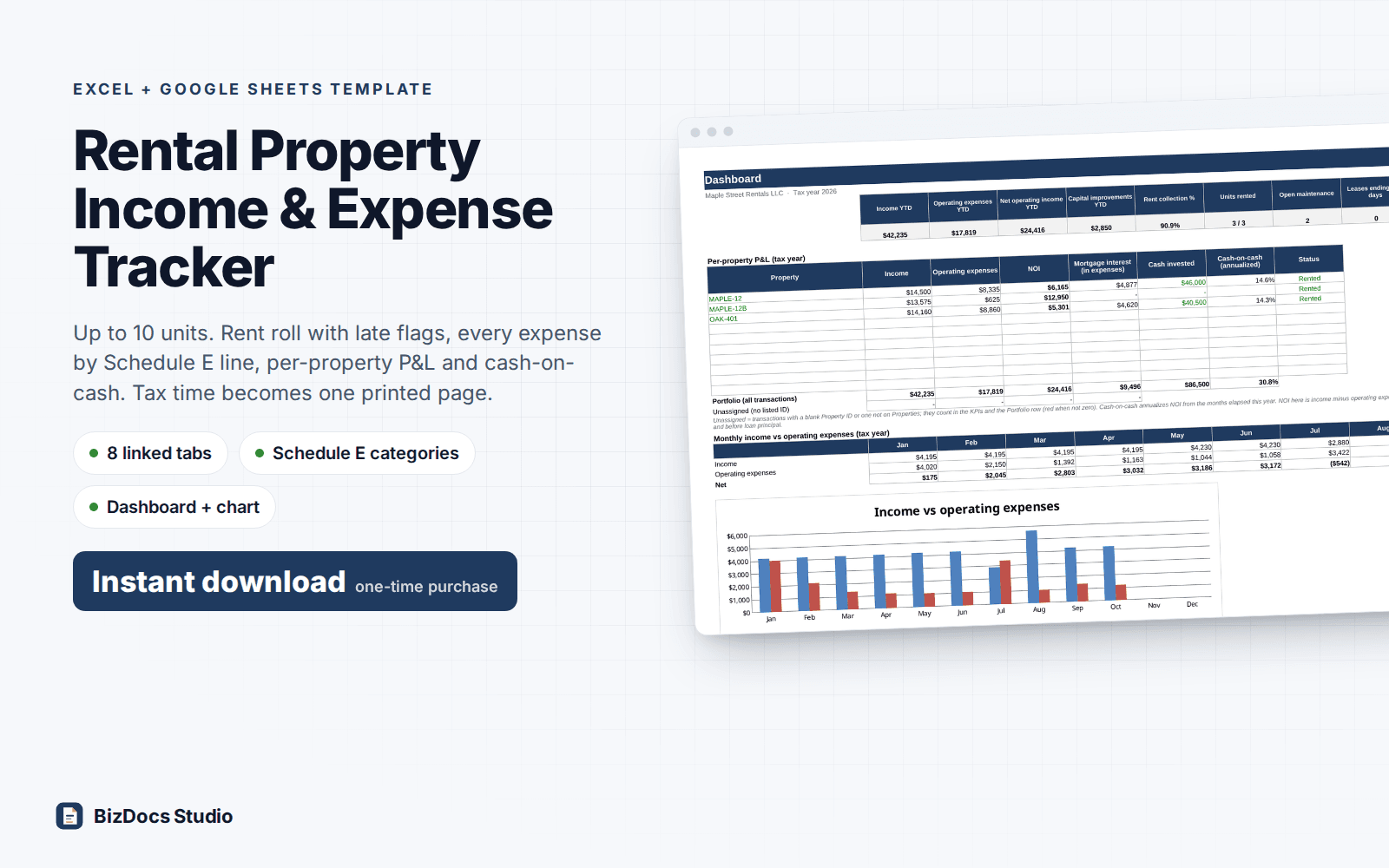
Eight KPIs: income, operating expenses and NOI year to date, capital improvements, collection %, units rented, open maintenance and leases ending within 60 days. A per-property P&L shows income, expenses, NOI, mortgage interest, cash invested and annualized cash-on-cash; its Portfolio row equals the KPIs, and an Unassigned line shows transactions without a listed property. A Jan to Dec table of income, operating expenses and net, with a column chart of income vs operating expenses. At the foot, printed as its own page, the Schedule E summary: the 17 categories and any you add, with their Schedule E line and tax-year amount, a line for expenses not in a listed category, total expenses excluding capital improvements, rents received (line 3), other income, and check lines for income not in a listed type, a Type that does not match the category, names or Property IDs listed twice, and a unit status that is blank or not on Settings. The sample shows $41,950 rent, $9,496 mortgage interest and $17,819.40 total expenses.
- 7
Maintenance
50 rows: date reported, property ID, issue, status from a list on Settings (Open, Scheduled, Done, with blank rows for your own), vendor, cost, date done and notes. Every job whose status is not Done counts as open on the Dashboard, the cost of jobs done in the tax year (by date done) is totaled, and jobs marked Done without a date, jobs with a blank or unlisted status and statuses listed twice are counted. The invoice still goes on Transactions, so the money is counted once.
What you can count on
- Enter money once on Transactions; Rent Roll, Dashboard and the Schedule E summary update themselves
- Missing, partial and late rent flagged in red per unit per month, by the month the rent arrived
- Per-property NOI and cash-on-cash return, annualized from the months elapsed in the tax year
- Expense categories mirror Schedule E lines 5 to 19, with HOA dues grouped under line 19
- Capital improvements tracked separately so they are not expensed by mistake; the sample's $2,850 roof section stays out of NOI
- Sample portfolio of 3 units, an Ohio duplex and a single-family house, with 81 transactions from January to October
- Rent Roll, Properties, Tenants and Maintenance each print on one landscape page, ready to save as PDF
- 1,200+ formulas (1,278), all visible and editable; sample totals verified to the cent against the raw rows
Last updated November 20, 2026. Buyers get updates to this version free, by email.
Before you buy
How many properties does it handle?
Ten units out of the box. Each tab has rows for 10 properties; the Transactions log holds 400 entries per file. For more, duplicate the file per portfolio or extend the ranges, nothing is locked.
Does it work in Google Sheets?
Yes. File > Import > Upload the .xlsx. Dropdowns, conditional formatting and the chart carry over. All formulas are Sheets-compatible; there are no macros. The file was tested in Google Sheets, including the Rent Roll colors and the chart.
Is it US-specific?
Expense categories follow US Schedule E lines, which most landlords want. Rename categories in Settings for any country; the math does not change. Currency is a number format you can switch.
Does it calculate depreciation?
No. Depreciation is a tax computation that depends on your basis and method, so it is left to your preparer. There is a Depreciation category if you want to record it; an amount recorded there counts as an operating expense and lowers NOI.
What happens when the 400 Transactions rows run out?
The sample uses 81 rows for three units over ten months, about 100 a year. Summaries filter on the tax year in Settings, so older rows never mix into this year's totals. When the log is full, save a copy for the new year and clear the Transactions inputs, or insert rows above row 404.
How is cash-on-cash return calculated?
Year-to-date NOI is divided by the months elapsed, multiplied by 12 and divided by the cash invested on Properties. NOI here is income minus operating expenses as logged: it includes mortgage interest, includes depreciation only if you record it as a category, and leaves out loan principal. A unit with no cash invested, like Unit B of the sample duplex, shows a blank.
Why does a month show red when the tenant paid late?
Rent Roll counts rent in the month you date it. In the sample, July rent paid on August 4 leaves July red at $0 and shows $2,700 in August. That red cell is the late flag, so log the real payment date and a note such as Rent Jul (paid late). Rent paid after the due day but within the same month is not flagged.
Does it connect to my bank or property management software?
No. There is no bank feed, import or sync; you type or paste each transaction. It is a record-keeping tool: it does not decide whether a cost is a repair or a capital improvement, or what you can deduct. Your tax preparer decides that.
What if it is not what I need?
Email us within 14 days and we refund you. No forms, no questions.
Learn before you fill it in
Rental Property Income & Expense Spreadsheet
$12 one-time · instant download · 14-day refund